AllMyNotes Organizer manual › Topic: How to Activate
Instructions for AllMyNotes Organizer 5.03 for Windows.
To activate Lite Edition license
The Lite edition does not require a license. Select Lite Edition when prompted.
To activate Deluxe Edition license
Purchase a license or request a trial key, then follow these steps:
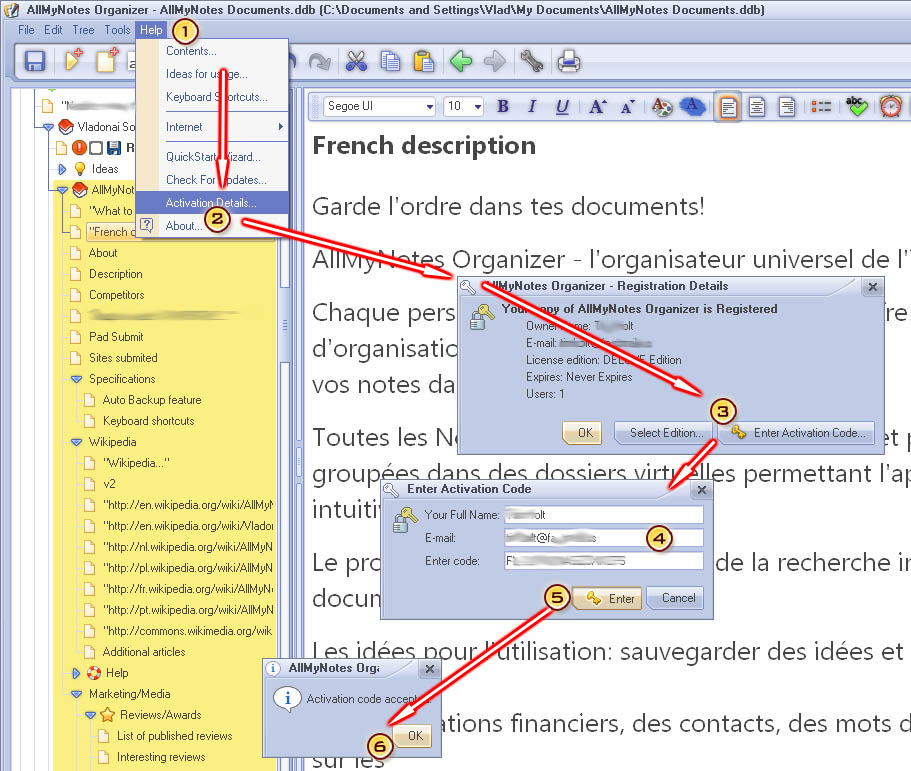
1. Open the Help menu.
2. Select Activation Details from the menu.
3. Select Enter Activation Code.
4. Enter your name, email address, and activation code exactly as they appear in your license email.
5. Select OK.
After the “Activation code accepted” confirmation appears, the Deluxe edition is activated and ready to use.
You can find the activation code and the exact registered name and email at any time in the Online Dashboard under My Licenses. If the key is missing, follow the license-recovery steps.
Or, do as illustrated below:
Thank you for supporting our work by purchasing AllMyNotes Organizer Deluxe Edition!
# # #
Feel free to contact us with questions, ideas, or comments.
