Hi Brent,
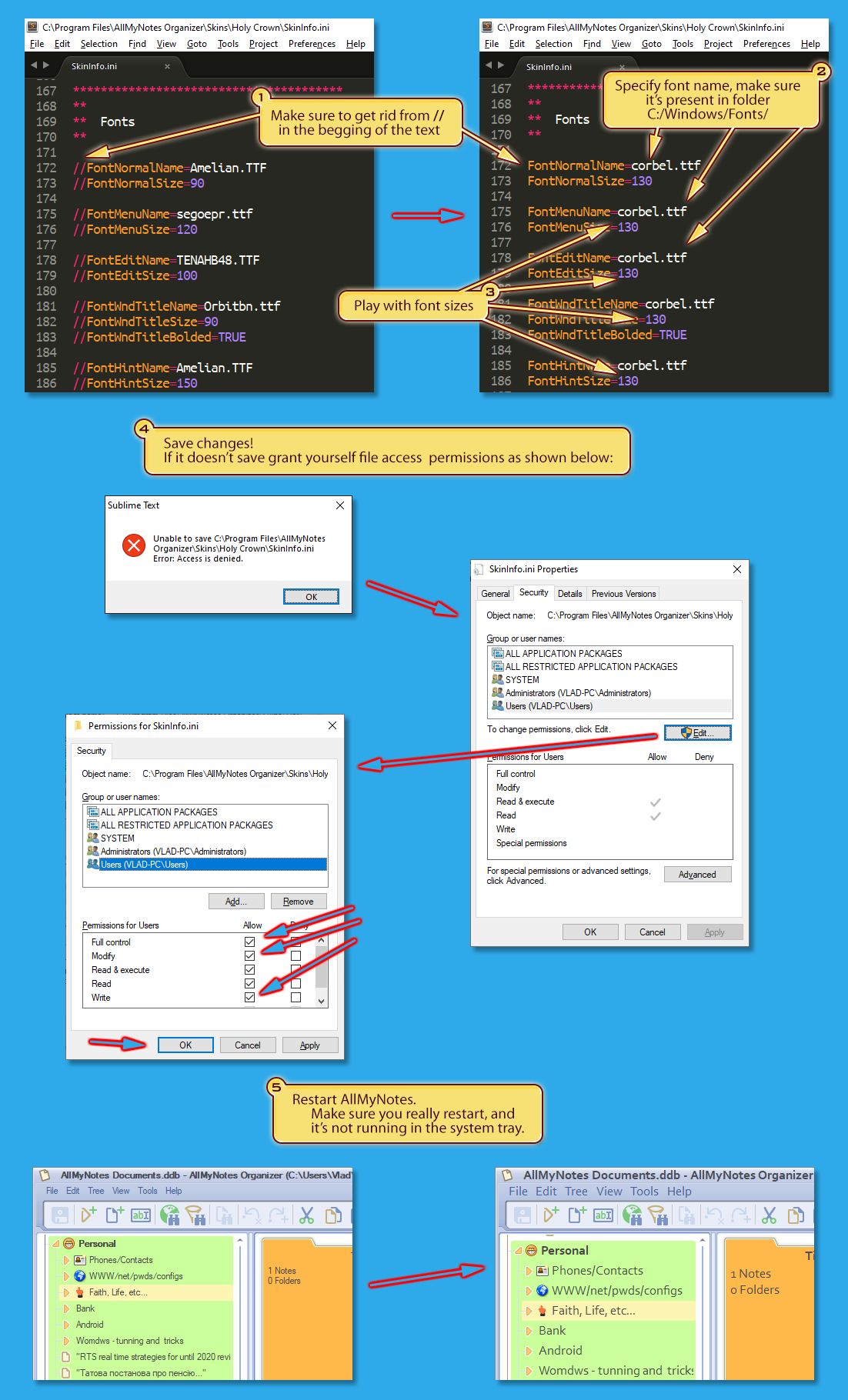
There is a solution. Font name/size can be specified in Skin configuration file. You can play with it by locating SkinInfo.ini file, and create/modify lines below:
***************************************
**
**  Fonts
**

FontNormalName=SegoeUI.TTF
FontNormalSize=90

FontMenuName=SegoeUI.TTF
FontMenuSize=85

FontEditName=SegoeUI.TTF
FontEditSize=100

FontWndTitleName=SegoeUI.TTF
FontWndTitleSize=90
FontWndTitleBolded=TRUE

FontHintName=SegoeUI.TTF
FontHintSize=150
Once you are done with modifications restart AllMyNotes.
You may notice that these lines are present in HolyCrown skin, but commented out (disabled, to use default Windows font).
There is one inconvenient thing about it - each time after installing an upgrade will be needed to restore these lines, as skin will be reinstalled too. To go around this issue I'd recommend creating copy of skin, renaming it, so that installer will not overwrite it. But still will be needed to update it in accordance with original skin file changes.
Please use this solution for now. And as a better solution I'll file for implementation an option to modify font size...
UPDATE Aug 2022, please see my illustrated guideline below for information how to do it: